Web Workers in 2026 are the boring fix nobody gets excited about, and that is exactly why they matter now. You shove the heavy work onto another thread, the click stays smooth, and your INP slides under the 200 ms green line while the crawler quietly approves. Web Workers have been in browsers since 2009, but once INP took over as a Core Web Vital, any JavaScript task that hogs the main thread past 50 milliseconds stopped being a nuisance and became a number Google scores you on. So that is the plan: the patterns I actually reach for, the ones I have learned to skip, the messy parts of cross-thread communication, and how to prove the change did anything at all.
The short answer
Move heavy synchronous JavaScript off the main thread with a Dedicated Worker so
clicks stay smooth and INP drops under the green line. Reach for postMessage with
transferable objects (ArrayBuffer, streams, OffscreenCanvas) to skip the clone tax,
wrap multi-method workers in Comlink, and prove the win with Total Blocking Time in
DevTools plus onINP field data. Skip the worker for work under about 4 milliseconds.
Web Workers have been in browsers since 2009. For most of that time I treated them as a curiosity, something I'd read about and never reach for. Then INP took over from First Input Delay as a Core Web Vital, and any JavaScript task that hogs the main thread past 50 milliseconds stopped being a nuisance. It became a number Google scores you on. Workers are the boring fix nobody gets excited about. You shove the heavy work onto another thread, the click stays smooth, and your INP slides under the 200 ms green line while the crawler quietly approves. So that's the plan here. The patterns I actually reach for in 2026, the ones I've learned to skip, the messy parts of cross-thread communication (transferable objects, SharedArrayBuffer, Comlink), and how to prove the change did anything at all instead of just feeling faster.
Why Web Workers matter more in 2026 than they did in 2022
A few things shifted since 2022, and together they dragged Workers out of the "nice to have" pile. Start with INP, which went live as a Core Web Vital in March 2024. It clocks the slowest interaction a real user hit on your page, the whole round trip, including whatever JavaScript fired when they tapped. Cross 200 milliseconds and Google files that tap under "poor." So the moment your filter button parses a 2 MB JSON blob synchronously, you've handed the search engine a latency number it can wave around next to your competitors. Bad look.
Then there's everything we now cram into the browser. Image editing in the tab. On-device ML inference, PDF generation, chewing through a CSV for a table with thousands of rows, end-to-end encryption for chat, AR pose estimation. By 2026 users just expect this stuff to run locally. No backend round trip, no spinner. And every one of those, left on the main thread, is a multi-second freeze. I once watched a "quick" client-side encryption call lock up a UI for four seconds on a mid-range phone. Four seconds. The user is gone by then.
The third one is quieter, but it's the reason any of this is pleasant now. The browsers grew up. SharedArrayBuffer works once you send the right COOP and COEP headers. OffscreenCanvas ships in every evergreen browser, and the APIs around Workers finally stopped surprising me at 11pm. The work to wire one up keeps shrinking while the payoff keeps climbing, which is a roundabout way of saying the math tips toward Workers in a lot more cases than it used to.
The three worker types and when to use each
You get three flavours. Honestly, you'll spend most of your time with one of them. The Dedicated Worker is the workhorse. One per page, talks only to whoever spawned it. It's the one you want whenever a user action kicks off something heavy, or you've got background crunching to do on a single page. Shared Workers run as a single instance across every tab on the same origin, and you talk to them through a port. Sounds great for shared state, say a WebSocket several tabs want to listen on. But the API is fiddly enough that I've watched people give up and switch to Broadcast Channel, and I don't blame them. Service Workers are a different animal. They sit between the network and your page to intercept fetches, and they stick around after the page is gone. That's your tool for offline caching and background sync.
For the speed work in this guide? Dedicated Worker, nearly every time. Occasionally with a Service Worker bolted on for background sync. Shared Workers you can pretty much forget exist. I have. Haven't missed them.
Pattern 1: heavy compute offload
This is the one you'll use ninety percent of the time. Some chunky synchronous work, parsing or hashing or an image filter or a scientific calc, sits on the main thread and jams up input and animation frames while it runs. Hand it to a worker and the page breathes again. The starter version is tiny. Under 30 lines:
// worker.js
self.onmessage = (e) => {
  const result = expensiveCompute(e.data);
  self.postMessage(result);
};

function expensiveCompute(input) {
  // CPU-heavy work here
  return input.map(x => slowTransform(x));
}

// main.js
const worker = new Worker('/worker.js');
worker.onmessage = (e) => {
  renderResult(e.data);
};
worker.postMessage(inputArray);
Rough rule I go by: if the work is under about 4 milliseconds, don't bother. The worker spin-up (1-2 ms) plus the postMessage serialisation tax just eats whatever you saved. And if you're calling it over and over, build the worker once when the page loads, then keep reusing it. Spinning up a fresh worker on every click is a classic way to make things slower while feeling clever about it.
Pattern 2: streaming data processing
When the input is big, a multi-megabyte CSV, a JSON dump from a paginated API, a stream of video frames, don't heave the whole thing across the postMessage boundary in one go. Pipe it through a ReadableStream and let the worker chew it chunk by chunk. As of 2026, Streams in workers work everywhere, so there's no compatibility excuse left to hide behind.
// main.js
const response = await fetch('/api/large-data.json');
const worker = new Worker('/parse-worker.js');
worker.postMessage({ stream: response.body }, [response.body]);

// parse-worker.js
self.onmessage = async (e) => {
  const reader = e.data.stream.getReader();
  while (true) {
    const { done, value } = await reader.read();
    if (done) break;
    processChunk(value);
  }
  self.postMessage({ status: 'complete' });
};
That [response.body] bit is the transferable list, and it's easy to gloss over. Once you hand the stream off, the main thread can't touch it anymore. Ownership really has moved to the worker. That's the whole point. Nothing gets copied, so it's the cheapest way to get a stream across the thread line. Try to read it on the main side afterward and you'll get a confusing error. Just remember it's gone.
Pattern 3: OffscreenCanvas for graphics work
Canvas work used to be a special kind of pain. Image filters and chart renders drew synchronously on the main thread, same for a viz plotting thousands of points, so the page locked up while it painted. OffscreenCanvas finally fixed that for me. It hands the rendering off to a worker and leaves the main thread free, so clicks keep landing while the heavy drawing happens somewhere else.
// main.js
const canvas = document.getElementById('plot');
const offscreen = canvas.transferControlToOffscreen();
const worker = new Worker('/render-worker.js');
worker.postMessage({ canvas: offscreen }, [offscreen]);

// render-worker.js
self.onmessage = (e) => {
  const ctx = e.data.canvas.getContext('2d');
  // Heavy drawing loop runs in the worker
  drawScene(ctx);
};
Where this really shines is charts. I had a dashboard rendering forty plots, and pushing each plot onto its own worker got me close to linear speedup on a multi-core box. The catch, and there's always one, is that there's no DOM inside a worker. So your tooltips and click handlers still live on the main thread, reading back coordinates the worker computed and messaged over. It works. It's just a little more wiring than you'd hope.
Communication: postMessage, transferable, SharedArrayBuffer
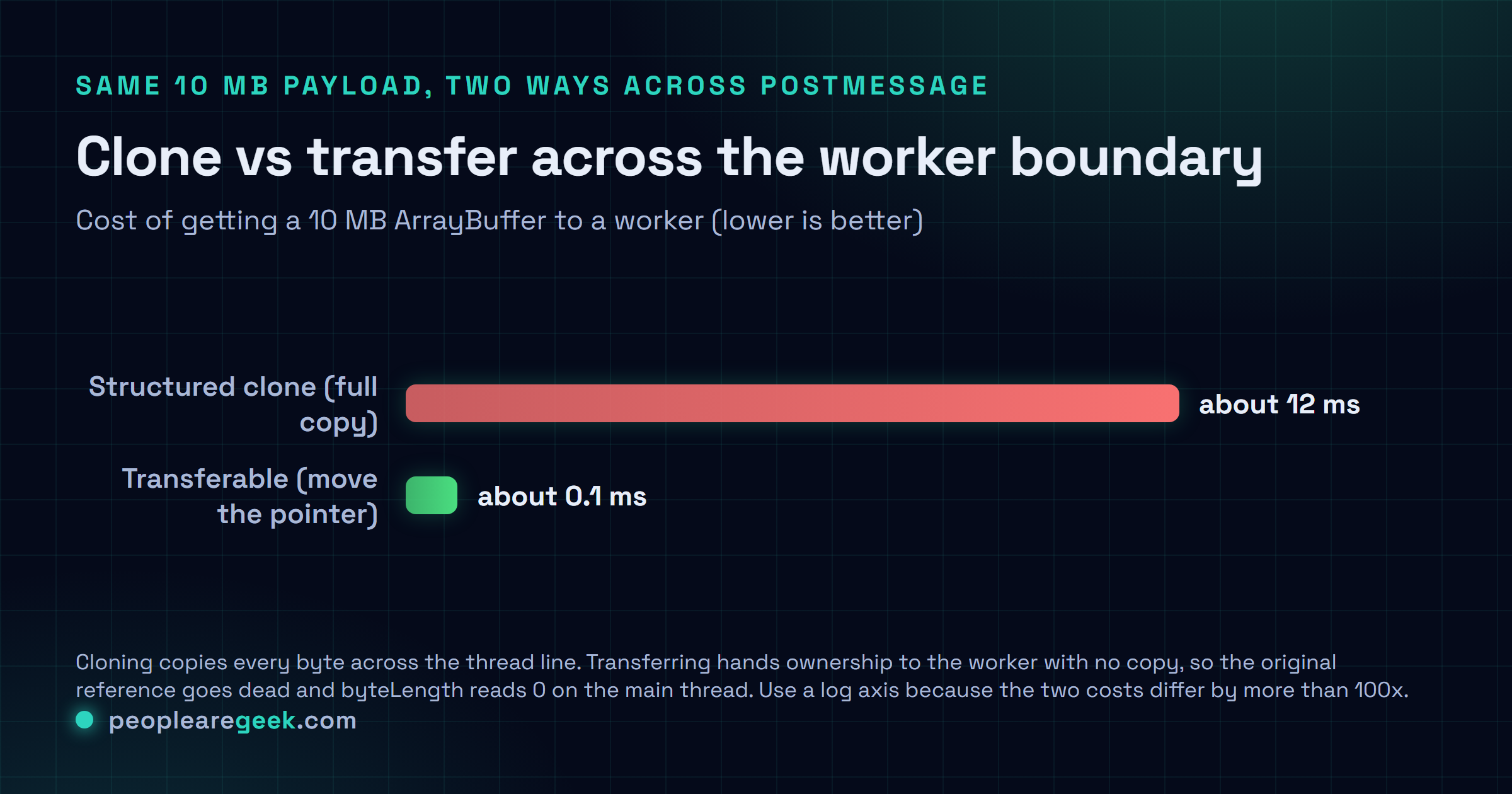
Talking to a worker runs through postMessage and the structured-clone algorithm. By default, anything you pass gets deep-cloned. A full copy, every time. For little JSON-ish payloads, who cares, it's instant. For megabyte-scale binary data, that copy can wreck you. I've seen it add more latency than the actual work it was supposed to speed up. There are a few ways out.
Transferable objects
A handful of types can be transferred instead of copied: ArrayBuffer, MessagePort, ImageBitmap, OffscreenCanvas, the stream types. Ownership jumps to the other side without a copy, and your original reference goes dead. You list them as the second argument to postMessage:
const buffer = new ArrayBuffer(10 * 1024 * 1024); // 10 MB
worker.postMessage({ data: buffer }, [buffer]);
// buffer.byteLength is now 0 on the main thread
For a binary pipeline, this is the gap between a 12 ms transfer (cloning 10 MB) and a 0.1 ms transfer (just moving a pointer). Use it every time you can.

SharedArrayBuffer
When the main thread and the worker genuinely need to read and write the same memory at the same time, SharedArrayBuffer is how you say so out loud. Pair it with the Atomics API and you've got real multi-threaded data structures. But it costs you at the door. Your site has to serve Cross-Origin-Opener-Policy: same-origin and Cross-Origin-Embedder-Policy: require-corp. And the day you flip those on, every cross-origin asset (CDN images, that embedded YouTube clip) has to opt in via CORS or come back with the right CORP header, or it just stops loading. That one has ruined an afternoon for me. So here's my take, and maybe it's just me being burned once too often: don't reach for SharedArrayBuffer unless the alternative, hammering transferables back and forth, is measurably worse. Most of the time it isn't.
Why Comlink is worth the 2 KB
Hand-rolling postMessage with onmessage handlers gets noisy fast. And matching responses back to requests by hand is exactly the kind of bookkeeping I hate. Comlink (Google's, about 2 KB gzipped) wraps the worker in a Proxy so you call its methods like plain async functions on the main thread. That's the whole pitch. It's a good one.
// worker.js
import * as Comlink from 'comlink';
const api = {
  parse(csv) { return parseCsv(csv); },
  filter(rows, predicate) { return rows.filter(predicate); }
};
Comlink.expose(api);

// main.js
import * as Comlink from 'comlink';
const worker = new Worker('/worker.js', { type: 'module' });
const api = Comlink.wrap(worker);
const rows = await api.parse(csvString);
const filtered = await api.filter(rows, Comlink.proxy(r => r.age > 18));
What you get back reads like an ordinary async API. No postMessage plumbing, no tagging requests with ids to pair them up later. Under the hood the serialisation cost is identical to raw postMessage, so you're not paying anything for the niceness. Any time a worker exposes more than one operation, I just start with Comlink and don't look back.
Measuring the impact on INP and TBT
The mistake I see more than any other is shipping the worker and never checking whether it helped. It feels faster. The page seems snappier, somebody high-fives, and the metric hasn't budged a millimetre. So treat these measurements as your contract for "this actually worked," and don't sign it early.
- Lab measurement with Chrome DevTools Performance panel. Record the same interaction before and after you add the worker. The Total Blocking Time number in the summary is your apples-to-apples comparison. And watching that one fat long task shrink in the flame chart is honestly the most satisfying part of the whole job.
- Field measurement with the web-vitals JavaScript library. Hook
onINPinto your analytics and compare INP p75 across the 28 days either side of the deploy. Search Console's Page Experience report runs on field data, not your laptop. So this is the number that nudges your ranking. - Long Tasks API on production. Subscribe to
longtaskentries with PerformanceObserver and log them somewhere you'll actually look. Before the change you'll see a steady drip of tasks over 50 ms. After, that histogram should slide left. If it doesn't, your worker isn't the bottleneck and you've been fixing the wrong thing.
Fair warning. The first time you wire all this up, the worker often helped less than you hoped, because something else was jamming the main thread the whole time. A third-party script, usually. Or some nasty layout thrash. That's not failure. That's the measurement doing its job. You fix the real culprit, you measure again, and you go around the loop as many times as it takes.
Common mistakes that cancel the benefit
- Tiny payloads, repeated round trips. Fire 50 messages a second of 100-byte payloads and the postMessage overhead quietly costs you more than the worker ever saved. Batch them. Or just don't use a worker here at all.
- Creating a worker per interaction. Spinning one up runs 1-2 ms on a nice laptop and up to 20 ms on a tired Android. Build it once at page load. Then you'll never think about it again.
- Forgetting transferables. Clone a 5 MB Uint8Array through postMessage and you've just bought yourself 6 ms of latency for nothing. Transfer the underlying ArrayBuffer instead. Same data, near-zero cost.
- Memory leaks via global state. A worker that keeps piling results into a module-level array grows until the tab dies, because nobody ever told it to let go. Send it an explicit reset message and save yourself the 3 a.m. memory-graph stare.
- Synchronous worker termination on navigation. Calling
worker.terminate()in a beforeunload handler won't wait for messages still in flight. It just guillotines them. If the worker was mid background-save, that data's gone. Use Service Worker background sync for anything that has to survive. - Logging in a tight loop inside the worker. Every console line ships back to the main thread and manufactures the exact main-thread work you were trying to dodge. Strip
console.logout of your production build.
Sources and further reading
Frequently asked questions
Are Web Workers worth the complexity for a small site?
Honestly? If it's a marketing site with no heavy client-side work, don't bother. You'd be adding complexity for nothing. But the second your app starts parsing data, crunching images, filtering a big search or drawing charts in the browser, yes. It earns its keep. My rough line in the sand is about 50 ms of work per interaction. Past that, a worker starts paying you back.
Do Web Workers help with First Contentful Paint?
Not really. Or only sideways. FCP is about how fast that first meaningful pixel lands, and that's ruled by your network and render-blocking JavaScript, stuff a worker doesn't touch. Workers earn their money after FCP, once the page is up and some heavy script is about to freeze it. If FCP is what's hurting, look at code splitting and resource hints first. That's where the win is.
Can I use ES modules inside a Worker in 2026?
Yep, and it's lovely. Pass type module to the Worker constructor and just write normal import statements in the worker file. Every evergreen browser handles it now. The only thing that'll trip you up isn't the browser. It's your bundler. Make sure whatever you run (Vite, or Webpack 5+, or Rollup) is set up to emit worker bundles properly, because a misconfigured one fails in ways that are genuinely annoying to diagnose.
Should I share a worker pool or instantiate per task?
Pool it. The pattern I keep coming back to: 2-4 workers (match navigator.hardwareConcurrency, capped at 4) sitting behind a task queue, with a round-robin dispatcher handing work out. Don't want to write that yourself? The workerpool library does it in about 5 KB. If you've only got one kind of task, though, a single worker really is all you need. Don't over-engineer it.
What is the maximum number of workers I should run?
Cap it at navigator.hardwareConcurrency minus one. Leave that last core for the main thread so the UI stays alive. Plenty of budget phones report just 2 cores total, which means in practice you're often looking at 1 to 3 workers, not the dozen you imagined. Go past what the hardware has and the OS just thrashes between them. You spend more time context-switching than computing, and everything gets slower.