The best Wi-Fi router 2026 is almost never the box with the biggest number on the shelf. I run a wired house with a homelab in the basement, and I have bought more routers than I would like to admit. Wi-Fi 7 is here and genuinely impressive, but most of you do not need it, and I will explain why without trying to sell you up. This guide is grouped by what you are actually trying to fix: dead spots, too many devices, an ISP box you want gone, or a homelab where you would rather separate the router from the access points entirely. Prices bounce around weekly, so go check the live price.
The short answer
For most homes the best buy in 2026 is a solid Wi-Fi 6 router (ASUS RT if you can stretch, TP-Link Archer if you cannot), not Wi-Fi 7. Dead spots in a bigger house want a mesh, cabled between nodes if you possibly can. Homelabs should split the router from the access points and add a UniFi AP. And whatever you buy, putting a rented ISP box into bridge mode is the cheapest, biggest win on this page.
I run a wired house with a homelab in the basement, and I've bought more routers than I'd like to admit. Some were a waste of money. The thing nobody tells you when you walk into "best router 2026" territory is that the box on the shelf with the biggest number on it is almost never the one you need. Wi-Fi 7 is here. It's genuinely impressive. Most of you don't need it, and I'll explain why without trying to sell you up. This guide is grouped by what you're actually trying to fix: dead spots, too many devices, an ISP box you want gone, or a homelab where you'd rather separate the router from the access points entirely. Prices bounce around weekly, so I'm not quoting numbers that'll be wrong by next week. Go check the live price, I'll point you at each one.
The quick comparison table
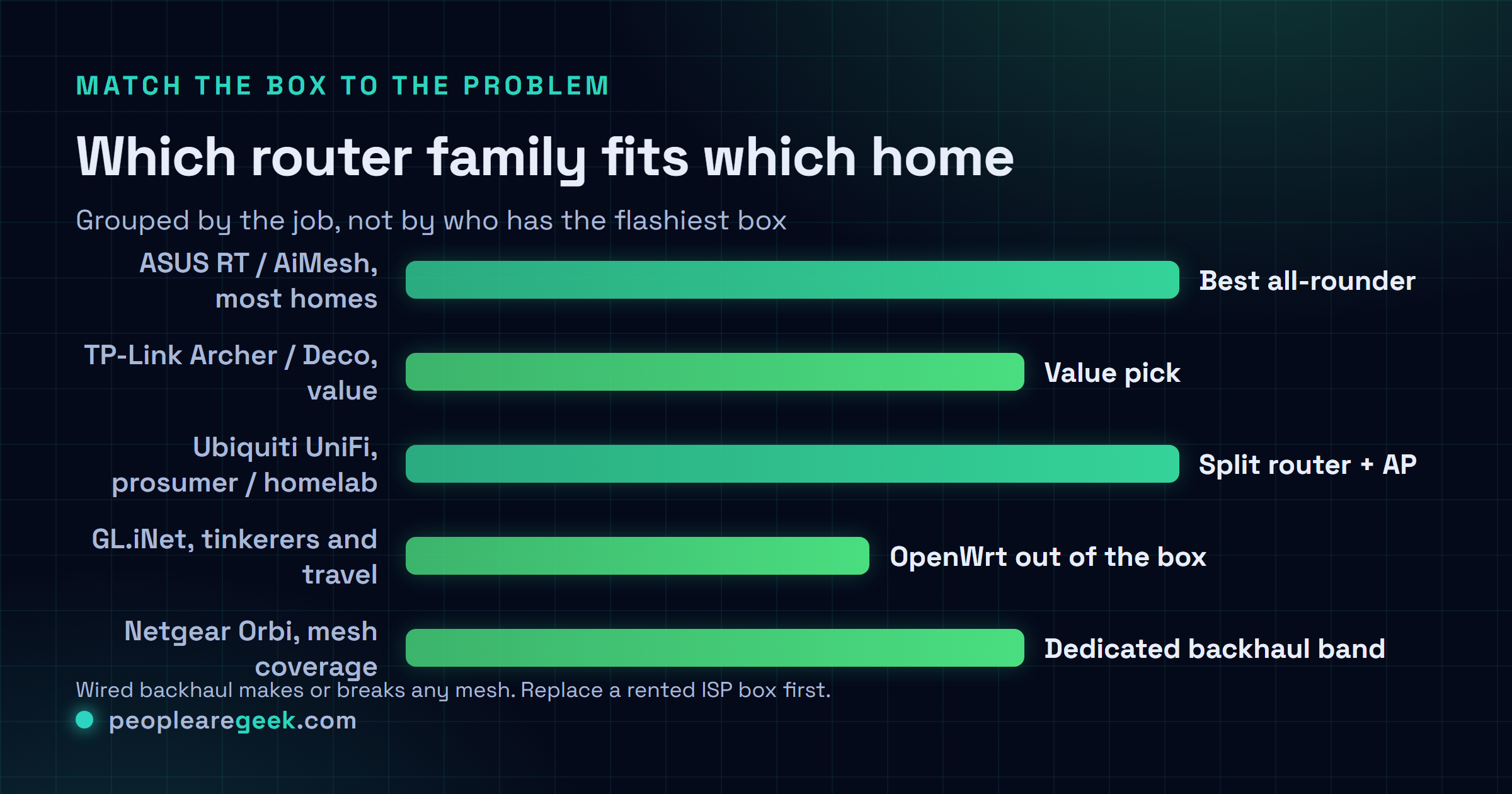
This is the shortlist I'd text a friend who asked. Grouped by the job, not by who has the flashiest box. The "watch-outs" column is the bit most reviews skip, so don't skim it.
| Family | Best for | Key strengths | Watch-outs |
|---|---|---|---|
| ASUS RT / AiMesh router | Most homes, strong firmware, easy mesh later | Great firmware, AiMesh lets you add nodes over time, big enthusiast community | You pay a bit for the name, some models are overkill for a small flat |
| TP-Link Archer / Deco | Value single router, or easy mesh on a budget | Cheap for the performance, Deco mesh is genuinely simple to set up | App-leaning setup, and there's ongoing US security scrutiny worth knowing about |
| Ubiquiti UniFi | Prosumers, big homes, separate router and APs | Excellent ceiling APs, lovely dashboard, scales to wired backhaul cleanly | Needs a controller, real learning curve, not a one-box plug-and-play |
| GL.iNet (OpenWrt) | Tinkerers, travel, anyone who wants OpenWrt out of the box | OpenWrt-based, VPN-friendly, tiny travel models, very hackable | Not the fastest Wi-Fi, smaller models are travel-sized not whole-home |
| Netgear Nighthawk / Orbi | Mainstream single router or Orbi mesh | Strong hardware, Orbi has a dedicated backhaul band that helps coverage | Some features sit behind a subscription, can be pricey at the top end |
What actually matters when you buy a router
Before any model names, this part. Get these right and the box almost picks itself. Get them wrong and you'll be back here in three months wondering why the new router didn't fix your dead bedroom.
The Wi-Fi standard vs your actual clients
Here's the trap. A router can only speak Wi-Fi 7 to a device that also speaks Wi-Fi 7. Your three-year-old laptop, your TV, that smart plug? They top out at Wi-Fi 5 or 6 and they don't care what the router supports. So buying Wi-Fi 7 for a house full of Wi-Fi 6 gear buys you almost nothing today. The standard is a ceiling, not a guarantee. Match it to what you own, plus maybe a little headroom, not to the marketing.
Coverage vs the one-box myth
The single biggest lie in router marketing is the coverage circle on the box. One router, no matter how many antennas it has, can't push a strong signal through a long house with thick walls. Wi-Fi is line-of-sight-ish, and walls eat it. If you've got dead spots, a bigger single router usually won't fix them. You need a second radio nearer the dead zone, which means mesh or a proper access point. More on that below.
Wired backhaul (the thing that makes or breaks mesh)
If you can run even one Ethernet cable to where the second node lives, do it. A mesh that links its nodes over a cable instead of over the air is a completely different, far better experience. Wireless backhaul steals airtime and roughly halves your throughput at the far node. Wired backhaul doesn't. Honestly, if your house has Ethernet in the walls, that single fact should reshape what you buy.
Number of devices
Count them. Not just phones and laptops, the whole zoo: smart bulbs, cameras, plugs, the doorbell, the thermostat. A modern home easily runs 40 or 50 connected things. Older routers choke on that long before they run out of raw speed, because each client costs management overhead. Wi-Fi 6 brought real improvements here (OFDMA, better scheduling), which is the actual reason most people should move to Wi-Fi 6, not the headline speeds.
2.5GbE WAN and LAN
If your internet plan is faster than a gigabit, or you're moving big files to a NAS, a 2.5GbE port matters. Plenty of mid-range routers ship one now. But be honest with yourself: if you've got a 300 Mbps connection and no local file shuffling, a 2.5GbE port is a spec-sheet flex you'll never use. Buy it for a reason, not for the number.
Firmware and update longevity
A router is a little internet-facing computer. It needs security patches for years, or it becomes a liability sitting on your network edge. This is where brand and firmware really earn their money. ASUS has a long track record of updates and a strong enthusiast firmware scene. UniFi gets steady updates if you keep the controller current. Anything running OpenWrt can be patched by the community long after the vendor walks away. Cheap no-name boxes often get one firmware and then nothing, which is exactly what you don't want guarding your front door.
Separate AP architecture for big homes
The pro move, and the one most people never consider: stop asking one device to be router, switch, and Wi-Fi all at once. Split the jobs. A small router (or a mini PC running OpenWrt or pfSense) does the routing, a switch does the wired side, and one or more dedicated access points do the Wi-Fi, ideally cabled back to the switch. It costs more up front and it's more to learn. But for a big house it's the most reliable Wi-Fi you can build, and it's why UniFi has the following it does.
One honest caveat on specs: router model names get refreshed constantly, and the same line can ship different chipsets, port speeds, or Wi-Fi standards depending on the revision. Always open the live listing and confirm the exact Wi-Fi standard, port speeds, and whether it supports wired backhaul before you buy. I'm describing families, not promising a fixed spec.

Best value: Wi-Fi 6 for most homes
If you're not sure what you need, you almost certainly want a solid Wi-Fi 6 router, and you can stop reading the rest of the spec war. Wi-Fi 6 (also called AX) is the sweet spot in 2026: it's cheap now, nearly every device made in the last few years supports it, and its real win isn't peak speed, it's handling a houseful of devices gracefully.
For a single-router home I'd look hard at an ASUS RT-series AX router or a TP-Link Archer. The ASUS costs a little more and pays you back in firmware quality and the option to bolt on AiMesh nodes later if you outgrow one box. The TP-Link Archer is the value play, strong performance for the money, just expect a more app-driven setup. Either one will comfortably run a normal home for years. Don't overthink this tier. It's where most people should land.
Wi-Fi 6E and Wi-Fi 7: when it's actually worth it
Now the part the marketing won't tell you straight. Wi-Fi 6E and Wi-Fi 7 both add the 6 GHz band, which is glorious: wide, clean, almost empty right now. The catch is brutal in its simplicity. Your devices have to support 6 GHz too, and most of yours don't. A lot of phones, almost all smart-home gear, plenty of laptops? No 6 GHz radio. So that beautiful empty band sits there mostly unused while your stuff keeps piling onto the older bands.
Wi-Fi 7 layers on more (wider channels, and Multi-Link Operation, which lets a capable client use two bands at once). When both ends support it, it's genuinely fast and lower-latency. But "both ends" is doing heavy lifting. In 2026, honestly, most homes don't have enough Wi-Fi 7 clients to feel it. I'd only reach for Wi-Fi 7 today if you've got a brand-new flagship phone or laptop you'll actually use on it, a fast internet plan, and you want the router to stay current for the next five or six years. That last reason, future-proofing, is the only one I find fully honest. If you're buying a router to keep for a long time and the price gap is small, sure, get Wi-Fi 7. If you're buying to fix a problem today, it probably won't.
Mesh: when it beats one strong router
Mesh isn't automatically better. It's better for a specific problem: a layout one router can't cover. A long house, multiple floors, an awkward extension, thick old walls. If that's you, a mesh system with two or three nodes will beat a single super-router every time, because it puts a radio closer to where you actually sit.
The systems I'd point people at: ASUS with AiMesh (you can even mix compatible ASUS routers into a mesh, which I love), TP-Link Deco for the easiest budget setup, and Netgear Orbi, which uses a dedicated band just for talking between nodes so your client traffic doesn't fight the backhaul. That dedicated-backhaul design is why Orbi tends to hold speed better at the far node than cheaper two-band mesh kits.
But read this twice: mesh over wireless backhaul roughly halves throughput at each hop. If you possibly can, cable the nodes together. A wired-backhaul Deco or AiMesh or Orbi setup is night-and-day better than the same kit running wirelessly. A small flat with no dead spots? You don't need mesh at all, and you'd be paying for nodes you'll never benefit from.
The prosumer and homelab path
This is my favorite tier, and where I actually live. If you run a homelab, or you just want enterprise-grade reliability and you don't mind learning something, stop buying all-in-one routers. Split the router from the access points.
The cleanest version: a dedicated router or firewall does the routing (a small box running OpenWrt, or a mini PC running pfSense or OPNsense), a managed switch handles wired traffic, and one or more Ubiquiti UniFi access points handle the Wi-Fi, cabled back to the switch with proper wired backhaul. UniFi is the prosumer darling for good reason: the ceiling-mounted APs are excellent, the dashboard is genuinely nice, and it scales. The honest catch is that UniFi needs a controller running somewhere (a small always-on device, or a Cloud Key, or a container on your homelab), and there's a real learning curve. It is not plug-and-play.
The cheap-but-great option a lot of people miss: a single UniFi access point wired into your existing network as a dedicated AP is one of the best per-dollar Wi-Fi upgrades you can make, even if you keep your current router for routing. You don't have to go all-in to get most of the benefit.
And for the tinkerers and travelers, GL.iNet deserves a shout. Their little boxes run OpenWrt out of the box, they're great for VPNs, and the travel models are perfect for hotel Wi-Fi or a portable lab. Not whole-home barnstormers, but for what they are, brilliant. If you want the full router-vs-AP philosophy, I wrote about the UniFi-vs-MikroTik decision separately, linked below.
Replacing your ISP router
Worth a section on its own, because it's the upgrade most people overlook and it's often the best value of all. That combo box your ISP rented you is usually mediocre Wi-Fi welded to a modem, and a lot of providers let you put it into "bridge" or modem-only mode and bring your own router. Do that and a good Wi-Fi 6 router will almost always outperform the rental, with better coverage, better firmware, and no monthly rental fee quietly bleeding you.
Two honest cautions. First, check whether your ISP even allows bridge mode, because some lock it down, especially where the box is also your phone line. Second, if you've got fiber or cable, you may need to keep their box as the modem and just disable its Wi-Fi, then plug your own router in behind it. Either way, you stop paying rental and you get Wi-Fi you actually control. I'd do this before I bought a fancier router, honestly. It's the cheapest win on this whole page.
What I'd actually buy
Cutting through all of it, here's what I'd reach for, depending on who's asking.
- Normal home, just want it to work? A good Wi-Fi 6 ASUS RT or TP-Link Archer. Skip Wi-Fi 7. This is the right answer for most people and I'm not going to pretend otherwise.
- Dead spots in a bigger house? A mesh system, and cable the nodes together if you possibly can. ASUS AiMesh, TP-Link Deco, or Netgear Orbi. Wired backhaul is the whole game here.
- Renting an ISP box? Put it in bridge mode and buy your own Wi-Fi 6 router first. Cheapest, biggest win on this page.
- Homelab or you love tinkering? Separate router from AP. A UniFi access point wired in, even just one, is a fantastic upgrade. Or OpenWrt on a GL.iNet box if you want to get your hands dirty.
- Buying once for the next six years and the price gap is small? Fine, get Wi-Fi 7. Just know you're future-proofing, not fixing today.
If you forced me to pick one answer for the most people, it's a solid Wi-Fi 6 router (ASUS if you can stretch, TP-Link if you can't), bought to replace a rented ISP box. That combination fixes more real problems for less money than chasing the newest standard ever will. You can graduate to UniFi later. I did.
Sources and further reading
- Wi-Fi Alliance, Wi-Fi CERTIFIED 7 overview
- Wi-Fi Alliance, Wi-Fi CERTIFIED 6 and 6E
- OpenWrt, table of hardware and supported routers
Frequently asked questions
Do I actually need Wi-Fi 7 in 2026?
Probably not. Wi-Fi 7's best tricks (the 6 GHz band, wider channels, using two bands at once) only kick in when your devices support them too, and most homes in 2026 are still full of Wi-Fi 6 gear that can't use any of it. So a Wi-Fi 7 router talking to Wi-Fi 6 devices behaves a lot like a good Wi-Fi 6 router. The one honest reason to buy it now is future-proofing: if you're keeping the router five or six years and the price gap is small, go for it. If you're trying to fix a problem today, a solid Wi-Fi 6 router will do it for less.
Is one powerful router better than a mesh system?
It depends entirely on your floor plan. In a small or open home with no dead spots, one good router beats mesh and costs less. In a long house, across multiple floors, or through thick walls, no single router can cover it and a mesh wins because it puts a radio closer to where you sit. The catch with mesh is backhaul: if the nodes talk wirelessly you lose roughly half your speed at each hop, so cable them together if you can. Wired-backhaul mesh is excellent. Wireless mesh is a compromise.
Is TP-Link safe to buy?
TP-Link makes genuinely good value hardware, and the Deco mesh is one of the easiest setups around. That said, there's been ongoing scrutiny in the US about TP-Link gear and security, and it's fair to weigh that depending on how you feel about it. Practically: keep the firmware updated, put IoT devices on a separate network, and the same basic hygiene applies to any brand. If the scrutiny bothers you, ASUS and Ubiquiti are the usual alternatives. If value is your priority, TP-Link still performs well for the money.
Should I replace my ISP's router?
Usually yes, and it's often the best-value upgrade on the table. ISP combo boxes tend to have mediocre Wi-Fi, and many of them rent for a monthly fee. If your provider allows bridge or modem-only mode, you can put their box into that mode and run your own router behind it, which almost always gives better coverage and firmware. Check first that your ISP permits it, since some lock it down, especially when the box also handles your phone line. When it works, you stop paying rental and you get Wi-Fi you control.
What's the deal with separating the router from the access points?
It means you stop asking one device to be router, switch, and Wi-Fi all at once, and split those jobs across dedicated gear. A small router or firewall does routing, a switch handles wired traffic, and dedicated access points (UniFi is the popular choice) do the Wi-Fi, ideally cabled back to the switch. It costs more and there's a learning curve, plus UniFi needs a controller running somewhere. But for a big house it's the most reliable Wi-Fi you can build. You don't have to go all-in either: even one UniFi access point wired into your current network is a great upgrade on its own.