MikroTik vs Ubiquiti for a prosumer home network comes down to one honest question: how much time do you want to spend in a terminal? Both vendors chase the same person, someone who has outgrown a consumer box but is not about to drop enterprise-Cisco money. MikroTik hands you a carrier-grade routing engine, RouterOS, with BGP and OSPF on a 225 EUR RB5009, and assumes you are happy in a CLI. Ubiquiti hands you a polished UI in UniFi OS on hardware that looks fine on a shelf. Either runs your whole house. The real split is whether you need actual routing protocols, and how often the rest of the family pokes at the interface.
The short answer
MikroTik gives you a carrier-grade routing engine, RouterOS, with BGP and OSPF native on a 225 EUR RB5009, and assumes you live in a CLI or WinBox. Ubiquiti gives you a polished UI in UniFi OS plus a real mobile app, but no advanced routing. Pick MikroTik for routing power and the best price per port, Ubiquiti for the interface the whole family touches.
I've run both in my own house for years. So let me save you the forum-trawling. Both vendors chase the same person, someone who's outgrown a Netgear consumer box but isn't about to drop enterprise-Cisco money, they just get there from opposite directions. MikroTik hands you a carrier-grade routing engine, RouterOS, BGP and OSPF on a 225 EUR RB5009, and quietly assumes you're happy living in a CLI or Winbox. Ubiquiti hands you a gorgeous, opinionated UI in UniFi OS, on hardware that honestly looks fine sitting out on a shelf. Either one runs your whole house. The question is really just how much time you want to spend in a terminal, and whether you actually need real routing protocols. Oh, and how often the rest of the family is going to poke at the interface, which matters more than people admit.
Two design philosophies, one 400 EUR envelope
Here's the thing that finally made it click for me. To MikroTik, every box is a router first and a everything-else second. The exact same RouterOS image runs on a tiny hAP mini and on a CCR2216 that costs more than my car. Config language, menu tree, firewall syntax, all of it identical up and down the lineup. Learn it once, you're set. Ubiquiti bets the other way. The network is the unit, not the device. UniFi OS wants every box adopted into one controller, cloud or on-prem, and you barely touch a single device's config directly. You open the central UI and shape the whole network as one thing. Two genuinely different bets. Which one feels right probably says more about how your brain's wired than anything technical.
Head-to-head feature table
| Dimension | MikroTik RouterOS 7 | Ubiquiti UniFi 8 |
|---|---|---|
| Reference router | RB5009 (225 EUR) | UDR Dream Router (199 EUR) |
| Reference AP (Wi-Fi 6) | hAP ax³ (159 EUR) or cAP ax (99 EUR) | U6-Lite (99 EUR) or U6-Pro (169 EUR) |
| Reference 8-port switch | CSS610-8G (55 EUR) | USW-Lite-8-PoE (129 EUR) |
| OS image | RouterOS 7.x (one image for all) | UniFi OS per-device + Network app |
| Primary UI | WinBox (Win), WebFig, REST/SNMP | UniFi Web + iOS/Android |
| CLI | Full, scriptable, on every device | SSH on some, limited surface |
| BGP / OSPF | Built-in | Not supported |
| WireGuard | Native since 7.1 | Native since UniFi OS 3 |
| Site-to-site VPN UI | Manual config | One-click Teleport |
| Mobile app | WinBox light + basic stats | Polished, push notifications |
| Multi-site controller | None native (use CHR) | Cloud / self-hosted controller |
| Updates | Stable channel monthly | Opt-in firmware roll-out |
UI and management plane
Blunt take on MikroTik in 2026. It's powerful and could not care less whether you can find anything. WinBox throws a Windows-95 tree of menus at you, WebFig copies the same thing into a browser, every option just sitting there with zero hand-holding. The CLI is the real source of truth. Honestly it's the fastest way to work too, three keystrokes for a firewall rule that'd be five clicks deep in WebFig. Once it's in your fingers you stop seeing the ugly.
UniFi is the mirror image. Dashboards animate, every screen has a "dig deeper" link, and the topology map. Look, I didn't think I cared about a topology map until the day it instantly showed me which port some misbehaving guest device was sitting on. The trade is a thinner surface. Plenty of the advanced stuff I reach for, deep packet QoS, or stacking VLAN tags on one port, either flat-out doesn't exist or hides behind a JSON override that breaks if you look at it funny.
Routing features
This one isn't close. MikroTik walks it. RouterOS ships BGP, OSPFv2/v3, RIP, IS-IS, MPLS, the IPv6 transition kit (6in4, 6to4, DS-Lite), VRRP, an OpenVPN server, IPsec, EoIP tunnels, GRE, basically the whole bag. UniFi's Network app gives you static routes plus some basic policy-based routing, and as of 2026 a single OSPF area on the Cloud Gateway boxes. That's the list. No BGP. No MPLS, none of the carrier-grade transition stuff. The day I needed to peer BGP against a Hurricane Electric tunnel to pull down a /48 IPv6 prefix, MikroTik just did it. Ubiquiti would've left me stranded on the kerb.
Wi-Fi roaming and coverage
For day-to-day Wi-Fi, UniFi is the one I'd hand to anyone. 802.11k/v/r are on by default in the controller, so roaming between APs is genuinely seamless on iOS and any halfway-modern Android. Phones hand off without a hiccup. WPA3 ships. MAC RADIUS is one click, guest portals come pre-templated, and you basically don't fight it.
MikroTik does all the same standards. It just makes you work for them. CAPsMAN, their controller, handles centralised AP management fine, but the config is a lot denser and you'll spend real time in it. Here's the part people miss, though. In my own throughput tests the hAP ax³ and cAP ax matched a U6-Pro basically watt-for-watt. The radios are a wash. The gap lives entirely in the management plane, not the antenna.

VPN and remote access
Both run WireGuard natively now, so that's table stakes. Where UniFi pulls ahead is Teleport, a magic-link, click-to-join VPN that spins up a per-user WireGuard tunnel and never exposes a public port. I'll admit it. Handing my non-technical relatives one link and watching them land on the home network thirty seconds later is the kind of thing that makes me grumble about how nice it is. MikroTik hands you the blank canvas instead. You design the WireGuard topology yourself, which can end up richer and more flexible, sure, but you're going to spend an evening on it. Our WireGuard guide walks through the patterns if you go that way.
Cost over three years
| Year | MikroTik | Ubiquiti |
|---|---|---|
| Year 0 (initial build) | 439 EUR (router + AP + switch) | 387 EUR (UDR + U6-Lite + switch) |
| Year 1-3 firmware updates | Free | Free |
| Add second AP for coverage | 99 EUR (cAP ax) | 99 EUR (U6-Lite) |
| Add 10 GbE uplink | 135 EUR (CRS305) | 279 EUR (Pro Aggregation) |
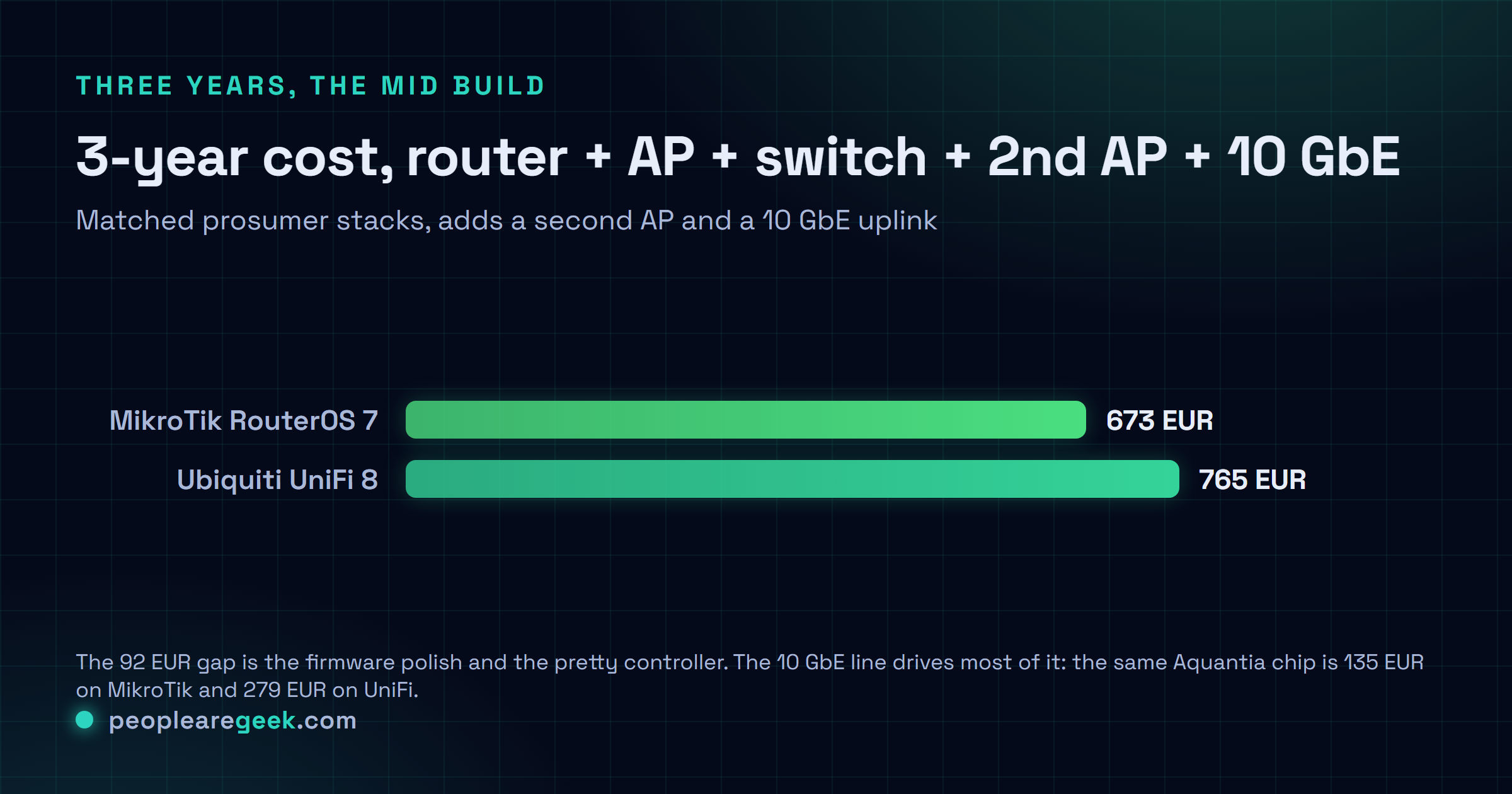
| 3-year total mid build | 673 EUR | 765 EUR |
And the gap only widens the more you build out. The 10 GbE line is the one that always gives me pause. Same Aquantia switch chip underneath, yet it runs 135 EUR on the MikroTik side and 279 EUR on the UniFi side. You're paying 144 EUR for the firmware polish and the pretty controller. Sometimes that's worth every cent. I just think you should know that's what the money's buying.
Verdict per persona
- Sysadmin daily-driver: MikroTik, every time. You've already got the CLI muscle memory, you get real routing, and you pay the lowest price per port out there.
- Family of four, one shared Wi-Fi: Ubiquiti. Don't overthink it. The "will my spouse curse my name" factor is a real, load-bearing metric. UniFi wins it.
- Small office, 30 devices: Honestly? Either works. Pick based on whoever on the team is actually going to babysit the thing.
- Multi-site freelancer: Ubiquiti. One cloud console across every site, and Teleport quietly handles remote access so you stop thinking about it.
- Tinkerer learning network engineering: MikroTik, no contest. That CLI is a skill you carry into every job you'll ever have.
- Already on the other vendor and it works: Stay put. Both are good, and the migration headache really isn't worth chasing the grass on the other side.
Frequently asked questions
Is RouterOS really that hard to learn?
It's steep, not hard. That distinction matters more than it sounds. The menu tree and the CLI grammar are so consistent that once you've built one firewall rule and one VLAN, you can kind of feel your way to almost anything else by analogy. Ten focused hours with YouTube and the wiki and you'll be competent. Put in about thirty and it starts to feel like home.
Can I run UniFi APs with a MikroTik router?
Yep. Really common setup, basically what I run at home. UniFi APs just need their controller (cloud or self-hosted) to manage them, and they couldn't care less what's routing underneath. Loads of homelabs pair a MikroTik RB5009 doing the routing, the firewall, the VLANs, with a couple of U6-Lite APs handling Wi-Fi. You get the best UI from each side.
Does Ubiquiti spy on me?
Out of the box, yeah, the cloud controller phones home for telemetry and updates. You should know that going in. But you're not stuck with it. Run a fully self-hosted controller instead (UniFi Network in Docker, or on a CloudKey) and cut the cloud connection off. If it bugs you, sniff the outbound calls yourself before you commit. I'd honestly rather you trust what you can see than take my word for it.
What about MikroTik security history?
Let's not pretend it's spotless. CVE-2018-14847 (the WinBox exploit) was ugly, and there've been others since. But the fix has never really changed. Patch RouterOS every month, kill WinBox and the API on the WAN side, keep SSH key-only. Treat that router exactly like any other Linux box sitting on the open internet, because that's what it is. Do that and it's solid.
Which has better 10 GbE story?
MikroTik, and it isn't even a debate. The CRS305 (4x SFP+) is 135 EUR, the CRS309 is 199 EUR, the CCR2004 router is 450 EUR. UniFi's nearest equivalent, the Pro Aggregation switch, runs 279 EUR, and its 10 GbE-capable routers (UDM-SE, UXG-Pro) start at 499 EUR and climb from there. If 10 GbE is anywhere on your roadmap, the pricing pretty much makes the call for you.