A web app security audit in 2026 is not pointing a scanner at the production URL and reading the report, because that covers maybe a quarter of what can actually hurt you. The surface got bigger while nobody was looking. REST and GraphQL APIs now move more traffic than HTML pages on most stacks I touch. CI/CD pipelines are stuffed with long-lived tokens that deploy straight to prod. And the dependency tree of even a medium app drags in hundreds of transitive packages, any one of which a single tired maintainer can poison. So I work in four layers: transport, app code, supply chain, secrets. What follows is the methodology I actually run, the exact tools and config I use, plus a 25-point checklist you can paste straight into your team wiki.
The short answer
Run a modern web app security audit in four layers worked in order: transport (TLS, HSTS, six headers, CORS), application code (auth, IDOR, GraphQL limits, uploads, SSRF), supply chain (dependencies, lockfiles, container images, CI workflows), and secrets (vault storage, scoping, rotation). The order matters, each layer makes the next one easier, and a 25-point checklist closes it out.
Still think a security audit means "point a scanner at the production URL and read the report"? Then you're auditing maybe a quarter of what can actually hurt you. The surface got bigger while nobody was looking. REST and GraphQL APIs now move more traffic than HTML pages do on most stacks I touch. CI/CD pipelines are stuffed with long-lived tokens that deploy straight to prod. And the dependency tree of even a medium app drags in hundreds of transitive packages, any one of which a single tired maintainer can poison. So I work in four layers: transport, app code, supply chain, secrets. What follows is the methodology I actually run. Opinionated. The exact tools and config I use, plus a 25-point checklist at the end you can paste straight into your team wiki.
Why a 2026 audit is different from a 2022 audit
Three things shifted under us in three years. First, APIs ate the traffic. A modern app exposes a REST or GraphQL surface that an SPA, a mobile client and a couple of bolted-on integrations all hammer in parallel, and a black-box scanner walking the human flows barely grazes it. I once watched a scan come back green on the marketing pages while an unauthenticated GraphQL introspection endpoint was quietly handing out the whole schema, every mutation included. Clean report. Wide-open door.
Second, the pipeline became attack surface. Every app of any size ships through GitHub Actions, GitLab CI, CircleCI, or somebody's lovingly neglected Jenkins box in a closet. Those pipelines hold deployment tokens, cloud creds, registry passwords, the whole keyring. So I read the pipeline config as carefully as I read the app code. Look, a workflow file an attacker can edit is a production key an attacker can use. Same thing, different file extension.
Third, almost everything calls an LLM now. Most non-trivial apps I see hit at least one model API, and plenty wire up RAG against a vector store full of customer data. Prompt injection, including the indirect kind that rides in on scraped content. Data walking out through a model response. Honestly I think we undercounted how fast this moved, because these stopped being conference-talk curiosities and turned into real findings on real audits. They live right where app logic meets supply-chain risk, so yes, they go on the list.
The four layers and how they map to OWASP 2025
When OWASP reshuffled the Top 10 in late 2025, it was basically catching up to this wider surface. My four-layer model lines up with that update. More usefully, it hands you an order to work in instead of a pile of findings to stare at and quietly dread.
- Transport and network. TLS config, HSTS, your CORS posture, allow-listed origins, rate limits sitting at the edge. Maps to A05 (Security Misconfiguration) and A07 (Identification and Authentication Failures).
- Application code. Authentication, authorisation, input validation, output encoding, SSRF, business-logic flaws, GraphQL introspection, the way you handle file uploads. Maps to A01 (Broken Access Control), A03 (Injection), A04 (Insecure Design), A10 (SSRF).
- Supply chain. Direct and transitive dependencies, package registries, container base images, IaC modules, GitHub Actions or GitLab CI references. Maps to A06 (Vulnerable and Outdated Components) and A08 (Software and Data Integrity Failures).
- Secrets management. Tokens, API keys, database URLs, JWT signing keys, encryption keys at rest. Maps to A02 (Cryptographic Failures) and the brand-new 2025 entry on secrets exposure in pipelines.
The order isn't arbitrary. Each layer makes the next one easier. Lock down transport and a lot of layer-two findings just stop being exploitable. Get the dependency tree clean and scoping secrets becomes a finite job instead of an infinite one. A tight secrets baseline then mops up whatever slipped past the first three. Skip ahead and you'll redo work. I learned that the slow way.
Layer 1: transport and network
Cheapest layer to audit. Also the one I see fail in production most often, which never stops being funny in a sad way. Four things to look at: the TLS cert, the HSTS setup, the security-header baseline, the CORS policy. None of it is hard. Teams skip it anyway.
TLS configuration
What I'm after: TLS 1.3 on, TLS 1.0 and 1.1 explicitly off, an ECDSA or RSA-2048+ certificate, OCSP stapling enabled, a valid chain with at least 30 days left before expiry. Set a monitor to page you at 14 days. That's enough runway to renew without a 2am panic. And don't sign the layer off until SSL Labs gives you an A or A+. When I get an A-, nine times out of ten it's TLS 1.0 still answering on some legacy origin box everyone forgot existed.
HSTS and security headers
My baseline for any public app is six headers: Strict-Transport-Security, Content-Security-Policy, X-Content-Type-Options, Referrer-Policy, Permissions-Policy and X-Frame-Options (or, the modern way, frame-ancestors inside CSP). For HSTS, don't drop below a year, subdomains covered:
Strict-Transport-Security: max-age=31536000; includeSubDomains; preloadIf you only fix one header, fix CSP. It buys you more than the other five put together. Here's a strict starting point that holds up for most React, Vue or Next.js apps:
Content-Security-Policy: default-src 'self'; script-src 'self' 'sha256-...';
  style-src 'self' 'unsafe-inline'; img-src 'self' data: https:;
  connect-src 'self' https://api.your-domain.com;
  frame-ancestors 'self'; base-uri 'self'; form-action 'self';
  report-uri /csp-report;
Run it in report-only mode for two weeks first. Collect the violations, see what legitimately breaks, then flip to enforce. Every single time I've watched someone skip the report-only phase, CSP took down a chunk of the site on deploy day. Usually a Friday. Usually the Friday before a launch.
CORS
CORS is where the leaks keep happening. My pattern: list every cross-origin endpoint, then check that Access-Control-Allow-Origin is a specific origin or a real allow-list. Never a wildcard sitting next to Access-Control-Allow-Credentials: true. That pairing is a straight-up credential exfiltration path. It's been on the OWASP cheat sheet for a decade and I still trip over it in production roughly once a quarter, which honestly I find a little depressing.
If your API reads tokens from the Authorization header, confirm preflight is handled on purpose, not just falling through to a framework default. Express, Fastify, FastAPI and Django all ship sane defaults now. But the sane default almost always loses to a copy-pasted "allow all" middleware that went in during the prototype and nobody ever tightened. That's the line I grep for first, every time.
Layer 2: application code
This is the big one. It's also where a scanner alone will never buy you peace of mind. I split it into three buckets and work them one at a time: the HTML/SPA surface, the API surface, file uploads. Trying to hold all three in your head at once is exactly how things slip through.
The HTML and SPA surface
On server-rendered pages I'm hunting the classic injection family. Stored XSS in anything user-generated, reflected XSS in search and error pages. Then server-side template injection wherever user input gets dropped into a template engine. SPAs have the same problem wearing a different hat: any HTML that goes out through innerHTML or React's dangerouslySetInnerHTML either comes from a trusted source or runs through DOMPurify. No exceptions. A pass with Semgrep or ESLint's security rules catches the obvious stuff and frees you up to think about the cases that actually need a human brain.
The API surface
With REST it's mostly an access-control exercise. Every endpoint needs auth unless it's deliberately public. Every authenticated endpoint has to enforce object-level checks, the classic "user 42 can't read user 43's invoice," because that one IDOR bug shows up more than any other on real audits. And every mutation validates the request body against a schema instead of trusting whatever the deserialiser handed back. GraphQL piles on. Turn off introspection in production, and cap query depth and complexity at the resolver so nobody DoS-es you with a deeply nested query. Enforce authorisation per field too. Read access to Order must not quietly grant read access to Order.customer.creditCardLast4, and by default it will.
Most teams I work with go contract-first: an OpenAPI or GraphQL SDL doc is the source of truth and the implementation gets checked against it. Good. Just don't forget to audit the contract itself. I've seen the spec leak sensitive fields, or hand an admin-only operation to the public role, and nobody questioned it because, well, it was "the contract."
The file-upload surface
File uploads don't come up often. When they go wrong, though, they go wrong badly. So: validate MIME and magic bytes server-side, and never, ever trust the client's Content-Type header. That field is a suggestion at best. Enforce size limits at both the web server and the app. Write randomised filenames into a directory that can't execute anything. Scan the content if you're storing documents people will later download. And allow-list the extensions you accept instead of playing whack-a-mole with a deny-list. One trap that quietly bites people: XML. Any XML parser in the path needs external entity resolution off (that's your XXE) and entity expansion capped (that's billion laughs). Both. Not one.
Layer 3: supply chain
In 2025 the supply chain passed application code as the number-one confirmed root cause of breaches. Sit with that for a second. The code you didn't write is now likelier to sink you than the code you did. Four families of artefacts to check.
Direct and transitive dependencies
Wire npm audit --omit=dev, pip-audit, bundle audit, cargo audit, whatever fits your stack, into CI. The bar I hold is zero critical and zero high in the production tree, with a written SLA for medium and low so they don't just rot there forever. Here's the mistake I see constantly. Dev and prod findings get dumped into one noisy stream, it gets so loud everyone tunes it out, and then nobody reads any of it. Split them. A clean prod tree you actually look at beats a giant report nobody opens.
The lockfile is the source of truth
Audit the package-lock.json, yarn.lock or Pipfile.lock, not the manifest. The lockfile pins exact versions and hashes. A package.json full of caret ranges can quietly resolve to something different on the next CI run, and now your "audited" build isn't the build that shipped. So make CI hard-fail when the lockfile is missing or stale. Without that, the whole supply-chain check is theatre. You're auditing a snapshot that won't match production anyway.
Container base images
If a service ships as a container, scan the base image with Trivy, Grype or Snyk before the Dockerfile change merges. Before, not after it's in prod. Pin the base to a digest, never a tag, and bump the digest on a schedule instead of letting latest drift under you while you sleep. The dependency-confusion attacks in 2025 made the cost concrete. A missing digest pin can resolve to a malicious image overnight, and you'd never see the diff.
CI workflow files
Go through every .github/workflows/*.yml looking for two things. One: uses: references pinned to a commit SHA, not a tag, not a branch. Two: least-privilege permissions: blocks set at the workflow or job level. Here's why the SHA matters. actions/checkout@v4 can turn malicious the day someone rewrites the v4 tag upstream, and you've just handed that action your whole pipeline. Pin it by SHA and that attack simply doesn't work. Same rule for GitLab CI's include: and CircleCI orbs. Pin them too.
Layer 4: secrets management
Want to fail an audit in record time? Let me run gitleaks or trufflehog over the repo and surface a live token. The runner-up: a secret printed into the GitHub Actions logs because nobody added ::add-mask::, sitting there in plaintext for anyone with read access. Then there's the long-lived personal access token doing CI's job, because setting up a proper deploy key felt like too much hassle that one afternoon. I find at least one of these on most first audits. Most.
So I ask five questions. Is every secret in a manager, Vault, AWS Secrets Manager, Doppler, GitHub Encrypted Secrets, instead of code or an env file? Is it rotated on a schedule, say 90 days for the powerful ones and 365 for the rest? Is it scoped to the smallest blast radius you can manage, one project and one environment? Is there an alert when it's used somewhere it shouldn't be, an IP restriction, a CloudTrail trigger? And the moment a new secret gets issued, does the old one actually get revoked? Or does it just sit there breathing, "just in case"?
That last one is where most teams quietly fail. Old secrets pile up. And then a former contractor's token logs in from a country nobody on the team recognises, three years after their offboarding ticket got closed and forgotten. If you do one single thing here, run a recurring "list every active secret older than 365 days" report. Cheapest hygiene win I know. It surfaces the ghost tokens before anyone else finds them.
The 2026 tooling stack
You can cover most of this audit for free. Honestly. Here's what I actually reach for: nuclei for templated DAST against APIs, Semgrep for static analysis (the community rule packs already cover all four major stacks), Trivy for containers and IaC, gitleaks or trufflehog for secrets, OWASP ZAP when I need to drive a real browser through authenticated flows, and SSLLabs, the free public service, to grade the TLS. That's a genuinely capable kit. It costs nothing.
The paid tier buys depth, not magic. Snyk or GitHub Advanced Security will watch the dependency tree continuously and open remediation PRs for you. Burp Suite Professional is what I reach for when I'm doing serious hands-on API testing. And a managed WAF, Cloudflare, AWS WAF, Sucuri, gives you a runtime backstop. My rule of thumb, and maybe I'm wrong here, it pays for itself around the third audit cycle. That's the point where the hours your team burns on triage start costing more than the licence.
The 25-point audit checklist
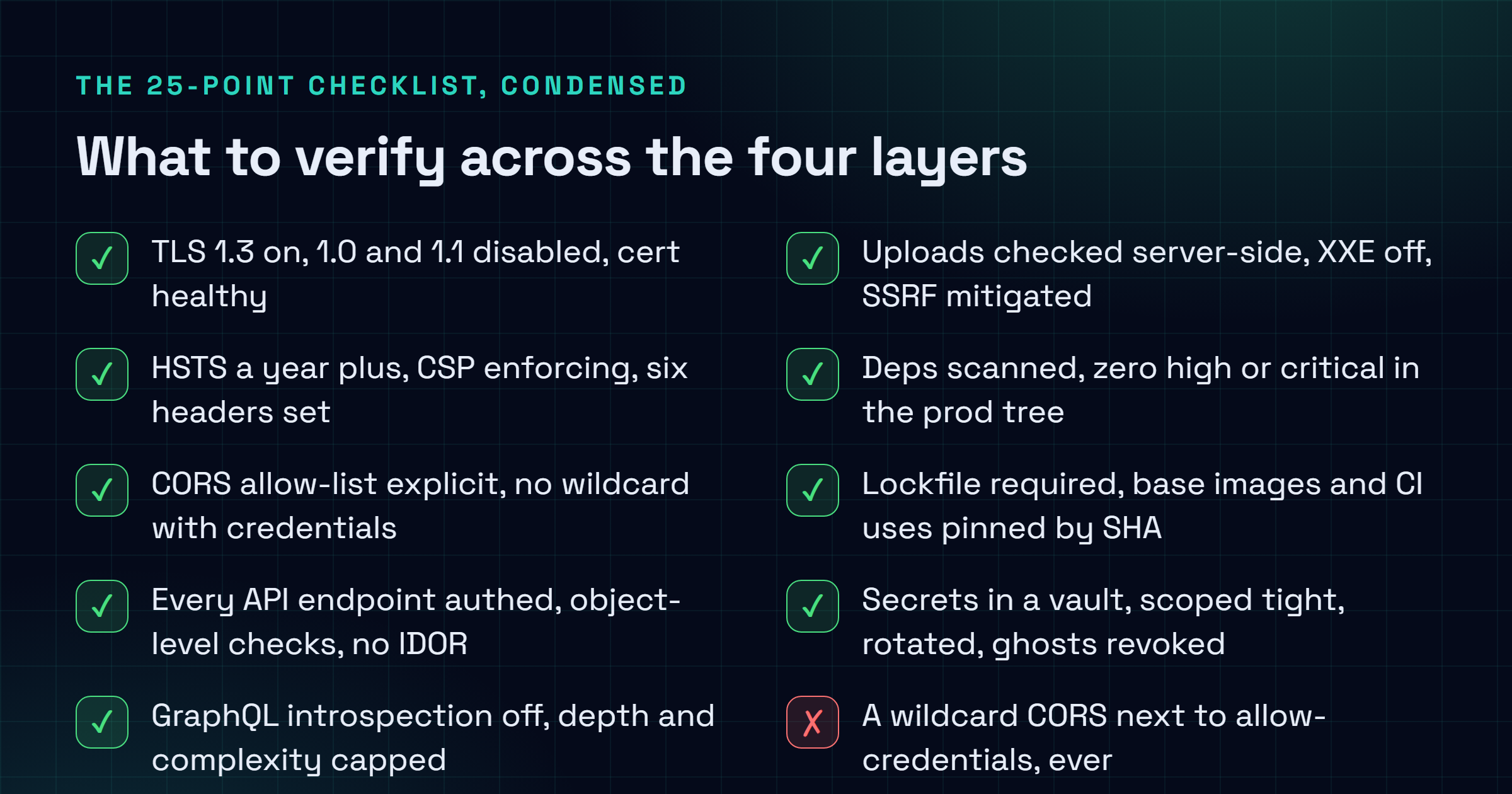
Run this once at launch, again every quarter, and any time the architecture shifts underneath you. The severities assume a public-facing production app. Adjust them down if you're behind a VPN or sitting on an internal-only network.

| # | Check | Layer | Severity |
|---|---|---|---|
| 1 | TLS 1.3 enabled, 1.0 and 1.1 disabled, cert > 30 days remaining | Transport | High |
| 2 | HSTS with max-age >= 31536000 + includeSubDomains | Transport | High |
| 3 | CSP at least at default-src 'self' in enforce mode | Transport | High |
| 4 | Six security headers present and correct | Transport | Med |
| 5 | CORS allow-list explicit, no wildcard + credentials combo | Transport | High |
| 6 | Edge rate limits configured per route family | Transport | Med |
| 7 | Every API endpoint requires auth unless explicitly public | Application | High |
| 8 | Object-level authorisation enforced (no IDOR) | Application | High |
| 9 | Request bodies validated against schema | Application | Med |
| 10 | GraphQL introspection disabled in production | Application | Med |
| 11 | GraphQL query depth and complexity limited | Application | Med |
| 12 | SPA dynamic HTML passes through DOMPurify or equivalent | Application | High |
| 13 | File uploads enforce server-side MIME and magic-byte check | Application | High |
| 14 | XML parsers have XXE and entity expansion disabled | Application | High |
| 15 | SSRF mitigations on any URL-fetching feature | Application | High |
| 16 | Direct and transitive deps scanned, zero high/critical in prod tree | Supply chain | High |
| 17 | Lockfile required, CI refuses missing or stale lockfile | Supply chain | Med |
| 18 | Container base images pinned to digest, scanned with Trivy | Supply chain | Med |
| 19 | CI uses: references pinned to commit SHA | Supply chain | Med |
| 20 | CI workflows declare least-privilege permissions: | Supply chain | Med |
| 21 | All secrets in a managed vault, none in code or env files | Secrets | High |
| 22 | Secrets scoped to one project and one environment | Secrets | High |
| 23 | High-privilege secrets rotated every 90 days | Secrets | Med |
| 24 | Old secrets revoked, no active secret older than 365 days | Secrets | High |
| 25 | Repo and CI logs scanned with gitleaks or trufflehog | Secrets | High |
Sources and further reading
Frequently asked questions
How long does a full audit take?
For a medium app, one frontend, one API, a couple of services, a database, budget about three engineering days for the first pass. After that, if the tooling's living in CI, the quarterly run is a day. Sometimes less. The first one always drags, because you're not just auditing, you're also figuring out where everything actually lives. That archaeology only happens once, thankfully.
What is the difference between a security audit and a penetration test?
An audit is structured and checklist-driven. It's going for completeness across the four layers, breadth over depth. A pentest is the opposite: exploratory, attacker-brained, hunting for that one creative chain a checklist would stroll right past. One doesn't replace the other. The audit gives you the floor. The pentest finds the weird path nobody thought of. I run the audit quarterly and bring in a pentest once a year.
Do I need a SOC2 or ISO 27001 process to do this?
No. None of this needs a compliance framework wrapped around it. It stands on its own just fine. That said, if you're already under SOC2, ISO 27001 or PCI-DSS, this checklist quietly knocks out a big chunk of the security-control requirements anyway. And if compliance is somewhere on your horizon, doing the work now makes that eventual audit far cheaper and a lot less painful.
How do I audit a SaaS that I integrate but do not control?
You can't pentest someone else's box. So you lean on evidence instead. Ask for their latest SOC2 report, or fill out their security questionnaire. Check they've got a public security policy and a way to report bugs, because a vendor with no disclosure programme is a quiet red flag. Confirm the data they touch is encrypted in transit and at rest. And tighten the API token your app hands them down to the minimum scope it genuinely needs. For the vendors you can't live without, I fold an annual review of their report into layer three.
What about prompt injection and AI API integrations?
Treat every LLM call like an untrusted execution boundary, because that's exactly what it is. Anything coming from outside (user uploads, scraped pages, retrieved docs) gets sanitised before it ever reaches the prompt. Keep system and user roles separate. The second you concatenate them, you've handed the user your instructions. Validate the output too: if the model is allowed to return JSON, check it against a schema before that result triggers anything sensitive. And log the prompts and responses for at least 30 days, because when something does go sideways, that log is the only forensic trail you'll have.